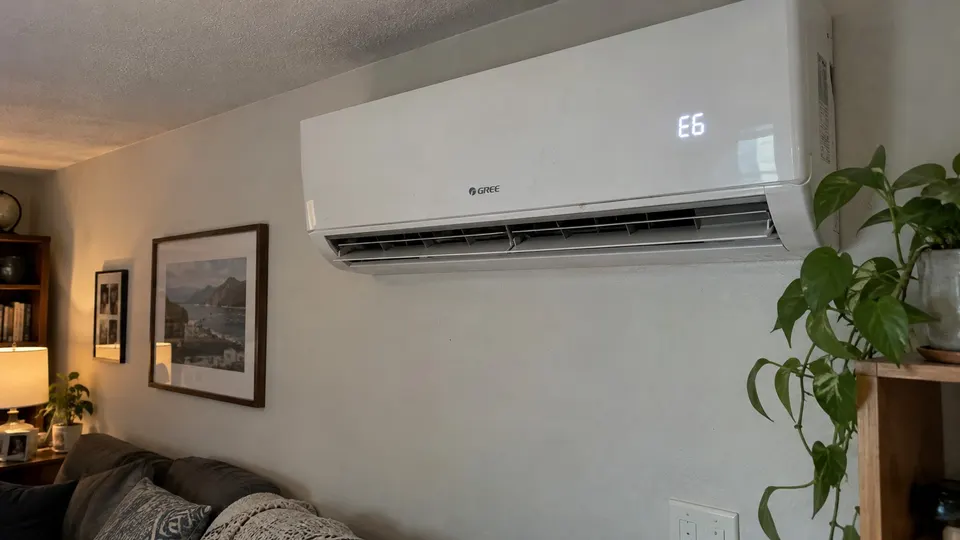
Short answer: Gree mini splits show a short code like E6 or E7 on the indoor display, or blink the temperature indicator, when they find a fault. E6 means the indoor and outdoor units are not communicating. E7 is a mode conflict on multi-zone systems, and you can fix it yourself by putting all indoor units in the same mode. Fo, with a lowercase o, is not a fault. On Gree's multi-zone service manual it is refrigerant recovery mode, used by technicians.
Where you will see the code
Gree's Vireo Gen3 owner's manual says that when the system is not working properly, the temperature indicator on the indoor unit blinks to show the matching error code. On other models the code appears on the display. The units also have a built-in self-diagnosis that shows fault codes on the display to help with troubleshooting.
Gree makes many series, and the code list changes between them. This guide covers the codes Gree explains in its Vireo Gen3 owner's manual, plus the E6 tech guide and the multi-zone service manual. Check your own manual for your exact model.
The codes people search for
| Code | What Gree says | What you can do |
|---|---|---|
| E6 | Communication error between the indoor and outdoor units (Gree's E6 guide) | Restart once. If it returns, call a technician. |
| E7 | Mode conflict. Make sure all indoor units run either COOL or HEAT in a multi-zone system (owner's manual) | Set every indoor unit to the same mode |
| Fo (multi-zone service manual) | Refrigerant recovery mode, a special service mode | Not a fault. Call your technician if it shows by itself. |
| F0 (Vireo Gen3 owner's manual) | Contact qualified professionals for service | Call a technician |
| E1 | In the owner's manual: restart, then call a technician if it returns. In the multi-zone service manual: high pressure protection | Restart once, then call a technician |
| E5, E8 | Restart the unit. If that does not correct the problem, call a qualified HVAC technician (owner's manual) | Restart once, then call |
| U8, H6, H3 | Same instruction as E5 and E8 in the owner's manual | Restart once, then call |
| C5, F1, F2 | Contact qualified professionals (owner's manual). The service manual explains F1 and F2 as indoor temperature sensor faults | Call a technician |
| E2, E9 (owner's manual) | Not error codes. They are operational status codes. | Wait and see if they clear |
One thing to know about E9: the multi-zone service manual lists E9 as an indoor unit water full error, while the Vireo Gen3 owner's manual lists it as a status code. If you see E9 and water is leaking, treat it as a water problem and check the drain. See mini split drain line.
What to do first, whatever the code
Record the code first, then use only the owner checks allowed by your manual.
- Write the code down. Take a photo of the display.
- Turn the unit off with the remote. Wait a minute.
- Turn it back on. If the code was a one-time glitch, it should clear.
- If it comes back, stop restarting it. That means a real fault.
E7: the one you can fix yourself
E7 is a mode conflict. It only matters on a multi-zone system, one outdoor unit running several indoor units. All the indoor units have to run the same type of mode, either cooling or heating, because they share one outdoor unit.
- Walk to every indoor unit and look at its display.
- Pick one mode, for example COOL, and set every indoor unit to it with its remote.
- You should see the code clear within a few moments.
Gree's manual says that this is the fix. If one room wants heat and another wants cool, the system cannot do both at once.
E6: the two units are not talking
Gree's own tech guide calls E6 one of the most common codes on its residential products. It says the code means a communication failure between the indoor and outdoor units, and that the most common cause is a wrong wire or a wire splice in the run between the units. It does not mean the outdoor board has to be replaced.
Gree also says that if the code shows right at startup, the technician should look at the indoor unit first, and if it shows after about 3 to 4 minutes, the outdoor unit first. This is useful to tell your technician when you call.
What you can safely do:
- Check that the breaker and the outdoor disconnect are on.
- Restart once.
- Look at the outdoor unit from the outside for visible damage, and keep your hands off the wires.
Checking the communication wire, the voltage or the boards is electrical work. Gree's tech guide for it tells technicians to disconnect power and use a meter or a service tool. That is where you stop and call someone.
Fo and F0: do not mix them up
On Gree's multi-zone service manual, the display shows "Fo" in the table of fault displays for refrigerant recovery mode, and the manual calls it a special mode. A technician puts the system in this mode to recover refrigerant before service. If you see it with no technician on site, call the person who services your system.
Separately, the Vireo Gen3 owner's manual lists "F0" with C5, F1 and F2 as a code where you contact professionals. The letter and the zero look the same on a small display, so check your manual and your model.
When to call a technician
Call a licensed HVAC technician if:
- The same code returns after one restart
- You see E6 on a system that worked before
- You see any code in the "call a professional" group, such as C5, F0, F1 or F2
- The unit is new. Call the installer first.
- There is ice, a hissing sound or oily residue near the unit
Do not open the electrical panel, touch the refrigerant lines, or add refrigerant.
Keeping the codes away
- Clean the filters on a schedule. See how to clean a mini split.
- Keep the outdoor unit clear of leaves, snow and shrubs.
- Set every indoor unit on a multi-zone system to the same mode when the weather is changing.
- Book a yearly check.
For the Gree remote buttons, see Gree mini split remote control.
Related reading
- If the app will not pair, see the Gree WiFi setup.
Sources
- GREE Vireo Gen3 owner's manual
- GREE: E6 error code troubleshooting guide
- GREE ductless multi-port system installation, service and troubleshooting manual
This is general information, not a repair manual for your exact model. Follow your unit's own manual.