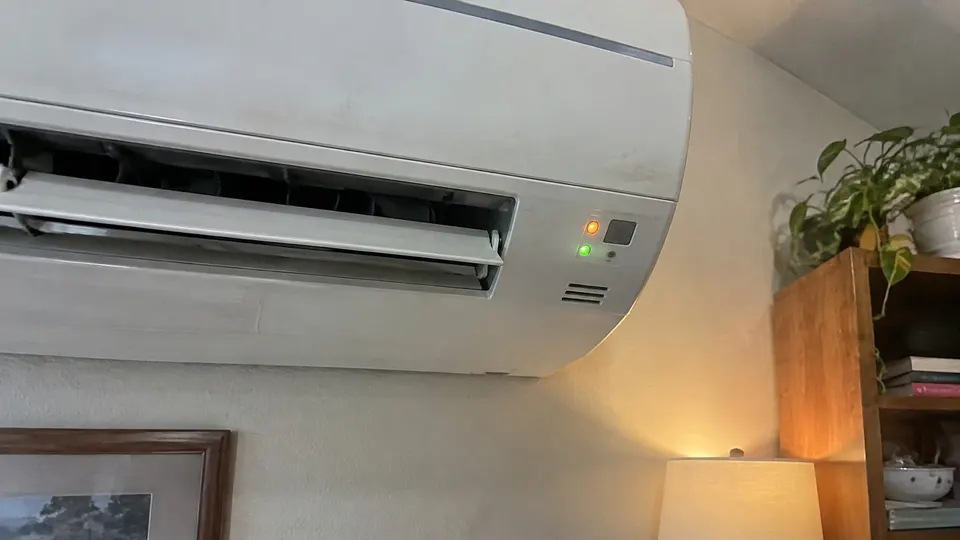
Short answer: A Fujitsu mini split shows a fault by blinking its Operation and Timer lights a set number of times. Count each light's blinks, read the matching two-digit code in Fujitsu's service guide, and write it down. Most codes point to a sensor, motor or wiring fault that a technician has to fix.
How to read the blinks
Fujitsu General America's troubleshooting guide for its 410A mini splits lists each fault three ways: how many times the Operation light blinks, how many times the Timer light blinks, and a two-digit code that shows on a wired remote. The guide lists the Economy light as steady during an error.
So "Operation 5 times, Timer 3 times" is code 53. Watch the pattern through two or three full cycles before you decide what you counted.
Two things to know before you look anything up:
- The guide you are reading from covers specific model families. Fujitsu has changed some codes across product lines, so check your own owner's or service manual for your model number.
- These codes are written for technicians. The "what to check" notes in the guide often involve meters and circuit boards. That part is not for owners.
Common codes and what they mean
All of these come from Fujitsu General America's troubleshooting guide. Operation blinks, then Timer blinks:
| Blinks (Operation, Timer) | Code | What Fujitsu lists |
|---|---|---|
| 1, 1 | 11 | Serial communication error. At start-up, the indoor and outdoor units are not talking to each other |
| 4, 1 | 41 | Indoor room temperature sensor error |
| 4, 2 | 42 | Indoor coil (pipe) temperature sensor error |
| 5, 1 | 51 | Indoor fan motor error |
| 5, 3 | 53 | Drain pump error. The float switch has been on for more than 3 minutes |
| 6, 3 | 63 | Inverter error |
| 6, 5 | 65 | IPM error (an outdoor circuit board protection) |
| 7, 1 to 7, 4 | 71 to 74 | Outdoor temperature sensor errors (discharge, compressor, coil, outdoor air) |
| 9, 7 | 97 | Outdoor fan motor error |
| 9, 9 | 99 | 4-way valve error (the part that switches between cooling and heating) |
| 10, 5 | A5 | Low pressure error |
The full guide has many more rows, including outdoor-only codes. If your pattern is not here, find it in the guide linked below.
What you can safely check
Stand in front of the unit with your phone, so you can photograph the lights before you touch anything. Go in this order.
Do this in order, and stop when something changes:
- Write down the pattern and the model number from the label on the indoor unit. A technician can use both.
- Look at the airflow basics. A clogged filter and a blocked outdoor unit cause protection stops on many systems. Clean the filter using how to clean a mini split and clear leaves and snow from around the outdoor unit.
- For code 53, look at the drain. The guide ties it to a float switch, which trips when water is not leaving the unit. See mini split leaking water for the visible checks.
- Turn the unit off with the remote and wait a few minutes before restarting once. If the same blink pattern comes back, the fault is real.
Expected results: if the code clears, keep watching for it. That alone does not identify the cause. If it comes back, stop restarting the unit.
When to call a technician
Call for service when:
- The same pattern returns after one restart
- The code involves a sensor, motor, inverter, valve, pressure or the indoor and outdoor units not communicating
- A breaker trips
- You see ice on refrigerant lines or smell burning
Do not open the unit, test wiring, or touch refrigerant lines. Those are technician jobs. Tell the technician the exact blink pattern. It saves diagnosis time.
If the unit is not cooling or heating and shows no code, read mini split not cooling or mini split not heating. A "DF" on the display is a normal defrost cycle, covered in what DF means on a mini split.
If there is no fault pattern and you need to check the selected mode, timer or lock instead, start with the Fujitsu mini split remote guide.
Sources
- Fujitsu General America: 410A Mini-Split Troubleshooting Guide (Rev. 5/2019) (a copy of the Fujitsu service document, part # 6-26-FG2020)
Follow your unit's own manual. This is general information.