Short answer: If a supported Panasonic mini split stops and its TIMER light blinks, retrieve the stored code using the remote procedure in your model's manual. The North American CS-XZ/CS-MXZ operating instructions list H and F diagnostic codes. Write down the complete code, turn the unit off and give it to an authorized dealer.
Match the model family
This guide uses Panasonic operating instructions ACXF55-35103 for CS-XZ9/12/15/18/24AKUAW and CS-MXZ5/7AKUA indoor units with the outdoor models listed in that manual. It is not a universal table for every Panasonic air conditioner.
Find your model on the paperwork or an accessible label. If the model or controller differs, use its own instructions. Do not force this sequence onto a remote without matching controls.
Retrieve a code with the matching remote
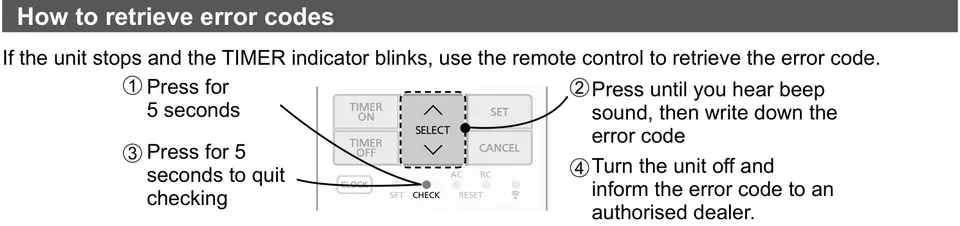
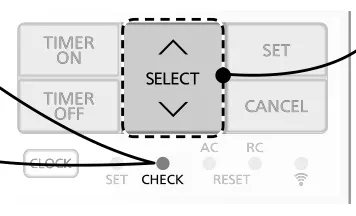
The manual drawing identifies the check control and code-selection control. Follow those locations, not an invented shortcut.
- If the unit stops and TIMER blinks, hold the indicated check button for five seconds.
- Press the indicated selection control until you hear a beep. Write down the code.
- Hold the check button for five seconds to leave checking.
- Turn the unit off and report the code to an authorized dealer.
Panasonic says certain errors can allow limited operation when four beeps sound at start-up. This is not permission to run every fault. Ask the dealer whether it applies to your code and model.
Selected code meanings
These examples come from the cited manual. Panasonic notes that some codes may not apply to your model and says to consult a dealer for clarification.
| Code | Description in this manual |
|---|---|
| H00 | No memory of failure |
| H11 | Indoor/outdoor abnormal communication |
| H12 | Indoor unit capacity unmatched |
| H14 | Indoor intake-air temperature sensor abnormality |
| H19 | Indoor fan motor mechanism lock |
| H21 | Indoor float-switch operation abnormality |
| H23 | Indoor heat-exchanger temperature sensor 1 abnormality |
| H27 | Outdoor air-temperature sensor abnormality |
| H33 | Indoor/outdoor misconnection abnormality |
| H97 | Outdoor fan motor mechanism lock |
| H98 | Indoor high-pressure protection |
| H99 | Indoor operating-unit freeze protection |
| F11 | Four-way valve switching abnormality |
| F91 | Refrigeration-cycle abnormality |
| F97 | Compressor overheating protection |
| F98 | Total running-current protection |
A code describes what the controls detected. It does not prove which part needs replacing. Do not buy a sensor or touch wiring based only on a sensor-abnormality entry.
H99 is not the RFP room setting
H99 is a diagnostic protection entry. Panasonic's selected RFP room freeze-protection feature is different. RFP is low-temperature heating for an unoccupied space, depends on power and normal operation, and is not a cure for H99.
Another brand's FP or H-code meaning cannot be copied into this table. See mini split code lookup for model checks.
When to stop using the unit
Panasonic lists abnormal noise, indoor water leaks, repeated breaker switching, an unusually warm power cord and controls that do not work among its non-serviceable conditions. For these, it says to turn off the power supply and contact an authorized dealer.
Do not remove electrical covers, reach into fans or work on refrigerant lines. Give the dealer the models, code photo and symptom. For a heating problem without a code, use mini split heating checks.
Care after the fault is resolved
Keep the manual with your equipment record. Clean accessible filters as the model directs, keep airflow clear and get professional help for recurring faults. Repeated resets can hide the pattern without fixing the cause.
Source
Remote-control drawings: Panasonic operating instructions, page 13.